















-
Recently active
Do you have questions about the Box AI API? This is the place to ask!
We are excited to introduce the latest generation (currently in Beta) of Box Python SDK, designed to elevate the developer experience and streamline your integration with the Box Content Cloud. With this release, you’ll have access to: Full API Support: The new generation of Box SDKs empowers developers with complete coverage of the Box API ecosystem. You can now access all the latest features and functionalities offered by Box, allowing you to build even more sophisticated and feature-rich applications. Rapid API Updates: Say goodbye to waiting for new Box APIs to be incorporated into the SDK. With our new auto-generation development approach, we can now add new Box APIs to the SDK at a much faster pace (in a matter of days). This means you can leverage the most up-to-date features in your applications without delay. Embedded Documentation: We understand that easy access to information is crucial for developers. With our new approach, we have included comprehensive documentation for
Hi, While fetching files from user of my organization. I am unable to fetch shared documents which is shared by user which is not in my organization. So, is it expected behavior. Also, in total count it displayed count with shared files but in entries it did not return the shared files.
Hello, I’m just getting started with Box CLI and need a way to batch remove hundreds of external users that have tens of thousands of collaborations within an enterprise. We can remove one at a time from the legacy admin dashboard, but I’d like to do this in batch via Box CLI, as advised by Box Support. I can’t find any documentation on external users specifically, only on the individual collaborations of managed users. Thoughts? -Vlad Weinstein
I regularly access files over FTP. This has not been a problem until recently. But at the moment, although FTP login is still successful, I receive a “Error on input file” error when attempting to get any file. Please help me resolve this.
We are excited to introduce the latest generation (currently in Beta) of Box TypeScript SDK, designed to elevate the developer experience and streamline your integration with the Box Content Cloud. With this SDK, you’ll have access to: Full API Support: The new generation of Box SDKs empowers developers with complete coverage of the Box API ecosystem. You can now access all the latest features and functionalities offered by Box, allowing you to build even more sophisticated and feature-rich applications. Rapid API Updates: Say goodbye to waiting for new Box APIs to be incorporated into the SDK. With our new auto-generation development approach, we can now add new Box APIs to the SDK at a much faster pace (in a matter of days). This means you can leverage the most up-to-date features in your applications without delay. Embedded Documentation: We understand that easy access to information is crucial for developers. With our new approach, we have included comprehensive documentation for
Looking to get advice on how to use content explorer and uploader in salesforce experience cloud as i seen in jan roundtable
Hey, I’m new to using box and I’m trying to explore the SDK/APIs. I want to generate a pre signed url (like in S3) to allow the user to upload files directly through my UI without having them interact with box. Also, is there a way to test the paid features like get a direct download link using my free dev account?
I am having some issues with an Apache Groovy script. When users run this script it sometimes returns this error - it fails at the line def subFolder = parentFolder.createFolder(subFolderName).getResource() BoxAPIResponseException: The API returned an error code [404 | m75vwdhfthirxg8m.0155c36fdf223f6693c60b71343f0bfc6] not_found - Not Found Exception chain: ScriptException: com.box.sdk.BoxAPIResponseException: The API returned an error code [404 | m75vwdhfthirxg8m.0155c36fdf223f6693c60b71343f0bfc6] not_found - Not Found …caused by: BoxAPIResponseException: The API returned an error code [404 | m75vwdhfthirxg8m.0155c36fdf223f6693c60b71343f0bfc6] not_found - Not Found Some users have found clearing their cache allows them to then run this script The box folder has AutomationUser_1282163_2jhq1tTUma@boxdevedition.com as an Editor The file names are unique names and do not contain illegal characters The parent folder exists Here is the relevant code import com.box.sdk.BoxFolder def today =
Hi all, I’m using the boxsdk python lib to search for files, and then retrieve the file’s content as a string. Something like: search_results = box.search().query(<my_params>) for file in search_results: content = file.content() Problem is after this point, the Download API returns binary data that I can’t seem to decode, I’ve tried different encoding formats using python’s in-built decode, utf-8, ascii, iso, etc. Is there some way of properly decoding the binary data into string text? Of course, I’m aware this won’t work for most file types, but would at least like to get .doc, .docx, .txt files as a starting point. I also don’t need to store the content into a file locally, just need to output the file contents. Thank you!
I have created application with Client Credentials Grant and when i am trying to use it with box_subject_type=user. i am getting “Grant credentials are invalid” error. I have checked client ID and client secret and user ID. Also I have checked App Access Only as i am trying with user subject type Note: I am using newly created free account without any subscription or trial
The get sign templates listing API call is returning a 500 Internal Server Error for me. This seems to be irrespective of whether making the call as a particular user or standalone. API: https://developer.box.com/reference/get-sign-templates/ Call fails whether through code or just curl, e.g. curl -L -X GET “https://api.box.com/2.0/sign_templates” -H “Authorization: Bearer <ACCESS_TOKEN>” Response is HTTP Code 500 “Internal Server Error” Anyone else see this when making a call to that API endpoint?
I’m trying to authenticate with OAuth 2.0 and I keep getting 401 unauthorized errors. I know for sure that I’m using my correct Client ID and Client Secret, so I’m not sure what’s going wrong.
I have enable my 15 day trail for Enterprise Account. But after generating access token with CCG, I am unable to get the data. while I am listing the folders items using https://api.box.com/2.0/folders/0/items but it show 0 entries in response with (200 response) but while using developer token I got full response. Do I need to add any permissions to fetch the files. Currently I have mark below two checkbox.
I’m using the following snippet, I don’t receive any event in uploaderClose method. var configData = { ACCESS_TOKEN: "XXXXXXXX", FOLDER_ID: "XXXXXX" }; function uploaderClose(e) { console.log('close:', e); } var optionsUploader = { 'onClose' : uploaderClose } var options = { 'container': '.explorer', 'contentUploaderProps': optionsUploader } var contentExplorer = new Box.ContentExplorer(); contentExplorer.show(configData.FOLDER_ID, configData.ACCESS_TOKEN, options);
I was testing out bun instead of npm or node and I couldn’t get the same behavior: what I mean by that is that running the app with bun I was not able authenticate, but I was with node (see below example) https://app.dashcam.io/replay/64ff8108923289006233ea16 Any idea what might be causing that?
As per Box documentation, the clearCache function of Content Explorer should force reload the items. But when I call the same function, I don’t see any reload of items in Content Explorer widget. I am using Content Explorer version 17.1.0. /** Clears out the internal in-memory cache for the content explorer forcing re-load of items via the API. @public @return {void} */ contentExplorer.clearCache();
We are referring the source code present in the following link: github.com box/box-java-sdk/blob/v4.4.0/doc/files.md#download-a-file Files ===== File objects represent individual files in Box. They can be used to download a file's contents, upload new versions, and perform other common file operations (move, copy, delete, etc.). <!-- START doctoc generated TOC please keep comment here to allow auto update --> <!-- DON'T EDIT THIS SECTION, INSTEAD RE-RUN doctoc TO UPDATE --> - [Get a File's Information](#get-a-files-information) - [Update a File's Information](#update-a-files-information) - [Download a File](#download-a-file) - [Upload a File](#upload-a-file) - [Upload Preflight Check](#upload-preflight-check) - [Upload a Large File in Chunks](#upload-a-large-file-in-chunks) - [Upload a Large File in Chunks Including Attributes](#upload-a-large-file-in-chunks-including-attributes) - [Upload a Large File Version in Chunks](#upload-a-large-file-
While checking pricing page in Box I saw we have 50000 API calls per month for Business Plan and for Enterprise we have 100,000 API calls per month. So, can anyone explain me how it’s work and where I can check how many requests are pending.
I have a folder ID and I have a leaf name. What I want is the full file details. At the moment I list the folder and look for the leaf name. This works but for large folders is very slow and requires lots of API calls. Is there an API which takes as input a folder ID and a leaf name and returns a file info just for that file? The best I’ve seen is get-search but that has several problems - it does a recursive search when given folder IDs which I don’t want, and I want an exact match for the file name, not a fuzzy one (its still fuzzy if you use “double quotes”). Any ideas? BTW this is for rclone!
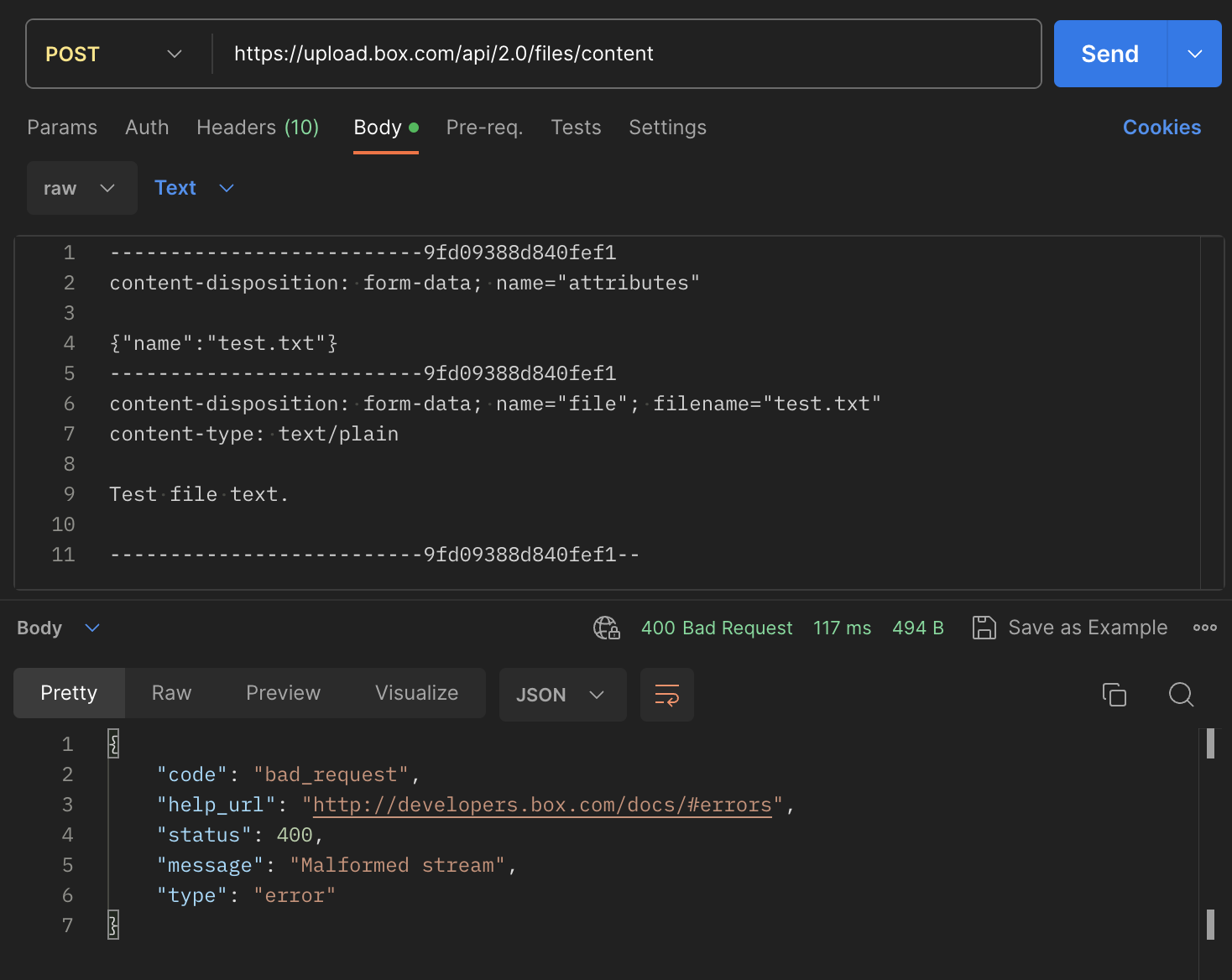
Get HTTP 400 error when invoking upload file API (https://upload.box.com/api/2.0/files/content). The message says “Malformed stream”, but gives no additional information. Tried the exact payload as specified in this box documentation page (https://developer.box.com/guides/uploads/direct/file/) and run it in Postman and still get the same error. Request Payload: POST /api/2.0/files/content HTTP/1.1 Host: upload.box.com Authorization: Bearer [ACCESS_TOKEN] content-length: 343 content-type: multipart/form-data; boundary=------------------------9fd09388d840fef1 --------------------------9fd09388d840fef1 content-disposition: form-data; name="attributes" {"name":"test.txt", "parent":{"id":"0"}} --------------------------9fd09388d840fef1 content-disposition: form-data; name="file"; filename="test.txt" content-type: text/plain Test file text. --------------------------9fd09388d840fef1-- Error Response: { "code": "bad_request", "help_url": "http://developers.box.com/docs/#errors"
I am using the following references, href="https://cdn01.boxcdn.net/platform/elements/16.0.0/en-US/explorer.css src="https://cdn01.boxcdn.net/platform/elements/16.0.0/en-US/explorer.js
Hi, a partners is sharing files with us through a box.com account. The files are store in folder tree. There are over 25K of files stored. We receive an xls files containing only filenames. We need to download files based on a filename but I do not know in which folder the file resides. I have made some attempts in python to search and download files, but it looks like my approach is incorrect or I am hitting API rate limits. I have noticed that if I have the file ID I can easily download the files, but I only have the filenames. What would be the best approach for me to create a automated solution using python and the box.com API? Would it be easy for the partner to give me the file_ids? Is there an easy way to retrieve those from all files that are uploaded? Or is there a fast way to search based on filename? I would love to hear what your approach would be.
I have a simple question, I am running a python script that searches for files regularly in box folders. Is there a way to refresh this box folder within my script? Thanks a lot.
I am using a python script to search for files in a specific folder, the folder contains over 25K files I have an excel with filenames that the script needs to search for. Part of the script looks like this: Start searching and downloading for file_name in file_names_to_download: print(f"Searching for {file_name} …“) search_results = client.search().query(query=f”{file_name}“, limit=10, ancestor_folder_ids=[folder_id]) exact_matches = [item for item in search_results if item.name == f”{file_name}"] if not exact_matches: print(f"No exact match found for {file_name}.") df.loc[df.iloc[:, 0] == file_name, 'Status'] = 'Not Found' continue if len(exact_matches) > 1: print(f"More than one exact match found for {file_name}. Using the first match.") item_to_download = exact_matches[0] print(f"Found {file_name}. Downloading ...") found_files.append(item_to_download.name) item_download_path = os.path.join(download_path, item_to_download.name) try: with open(item_downloa
Already have an account? Login
No account yet? Create an account
Enter your E-mail address. We'll send you an e-mail with instructions to reset your password.