








-
Recently active
Hello, I am using Box API Python SDK to list files. The metadata of files is important for my work. The files in the source folder are uploaded by myself and I am in UTC+09:00 timezone. But when I list the files using the API, all the timestamps returned by the API are in UTC-07:00. Please let me know if that is the default case? or is there anything I can do. SDK Version: 2.7.1 API: client.search.query(...) Thank you 🙂
Hello, I am having issues using the box-ui-elements React package. I have gotten the other “simpler” react components to work correctly with a developer token, but for w/e reason the ContentPreview component never renders the preview of the file. There are 0 errors in the console and if I enable the header it is able to display the file name correctly. So, the file ID is correct and the dev token is accurate since it works with other components on the same screen. Is this a known issue? It doesn’t seem like a sizing issue since it’s given plenty of space and the other components work just fine. Is there a working example repo I could run and supply my dev token & file ID to and see if it works? I ended up just using the raw JS CDN approach that some of the Docs outline to display the ContentPreview and that works just fine. So, I ended up just removing the entire box-ui-elements package since it wasn’t buying me much. I would like to actually use the package though since it is simp
Hi all, I have been currently tasked to automate the transfer of reports on a network drive to a shared folder on box. I was told to use box cli in conjunction with batch scripting to complete this. I have hit a roadblock in the creation of said script, and was looking for some additional perspective, as I may have missed a command or argument. Attached below is the “script” I tried to create for this project: robocopy "\\Network Folder" "\\Network Folder Archive" /MOV *.xlsx box folders:upload "\\Network Folder Archive" --parent-folder=(Shared Box Folder ID) The roadblock I have hit is in the transfer to box. Because box cli doesn’t overwrite folders, I cannot update the folder with new reports that come in. The other direction I wanted to take was to upload all of the files in the folder directly to box, but I couldn’t find a command to send all of the files to box at once. I experimented with the bulk csv commands, but because the monthly reports are going to have different file n
Hi, i’m new in programming. I’m developing a website that needs a Cloud. And our boss wants the BOX Cloud Services. I have little knowledge in API. I can’t a tutorial in youtube that specifically deals with how to integrate Box into a website, how to upload and retrieve data. Can someone please help me
Recently Box held an internal hackathon, and I participated exploring the idea of creating a Rust client for the Box API. What was I thinking? I wanted to see what it would take to build a Rust client for the Box API. Rust, my friends, is a powerful language designed for systems programming. It comes with a bunch of awesome features like memory safety, performance, concurrency, and developer productivity. So, why not harness its power? Sure, Rust may not be the easiest language to learn, but it’s like a strict teacher who won’t tolerate any errors easily. And you know what? I’ve come to appreciate its capabilities immensely. After working with Python for a while, I found myself yearning for a more disciplined approach, and Rust fit the bill perfectly. Now, you might be thinking, “But wait! Box already has SDKs for C#, Java, Python, Node, iOS, and Android. Do we really need Yet Another SDK (YASDK)?” Well, we’ve got you covered. If your favorite language isn’t on the list, you can always
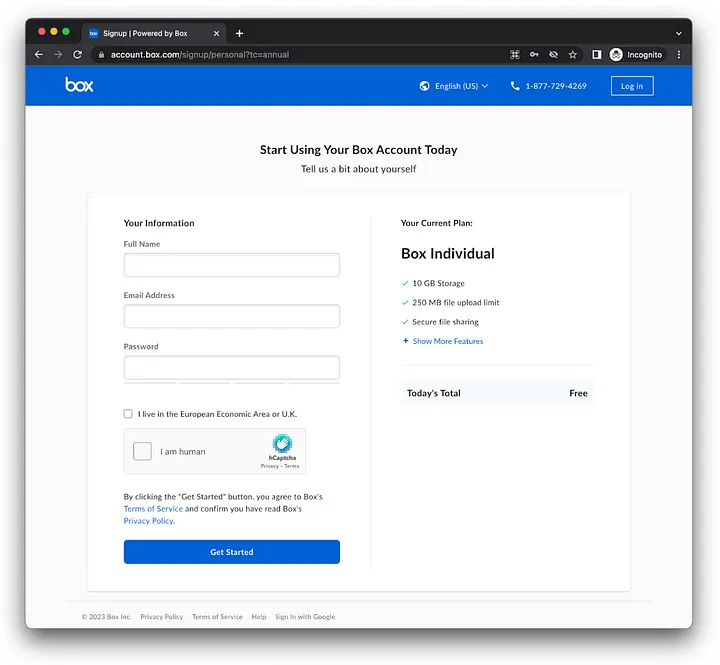
Get started with the Box Python SDK, using OAuth 2.0 in under 3 minutes I was looking for a way to get developers started using the Box platform as quickly as possible. Although Box provides many authentication methods, a recent incident with free developer accounts forced Box to limit the options for new free developer accounts. So I’ve decide to create a Python template application with built in OAuth 2.0, ready to go, allowing you to immediately start sending requests to the API. Create a free Box individual account Navigate to the personal sign up page, fill in your information, and submit. No credit card required… Box registration page for free individual accounts Complete the registration process, verifying your email. Tip: If you have a gmail.com account and don’t want to create a brand new account just for this, you can use something like your.normal.email+box@gmail.com. You can also use this to create multiple free accounts on box under the same email, and still be able to d
Question from developer: When working with BoxCLI or the Node SDK, the examples reference a file path to a .pem file. How do I create a .pem file, and have it work with the box app?
Got an interesting question from a developer: I would like to maintain the tags assigned to Box in bulk, is there any good solution? I was considering a way to use Box CLI, but the description of the CSV template does not mention tags, so I am looking for a solution. What I want to achieve and the conditions are as follows. What we want to achieve: I want to change the tags assigned to files in bulk with CLI. (e.g. tagA→tagB) I want to delete all tags assigned to files in bulk with CLI. Conditions: I am not an admin user. I am an ordinary user of a company.
Got an interesting question from a developer: Hi Team iI am new to Box REST API. Is it possible to download folder and all of its sub folder/files in 1 call ? if yes, whats the code for that in Python? I checked available docs and at link https://developer.box.com/guides/downloads/folder/ I can see there is some code to download folder contents but thats in .Net, Java and Node. Do we have something in python?
Got an interesting question from a developer: I have been provided a box folder from another user for me to upload files. I have a lot of files to upload to this folder. I created a personal account so I can get access. The files are on a remote Linux box. Is there a convenient way to bulk upload these files from the command-line? I’ve tried different ways (SFTP, generating access token, etc) but having issues with one restriction or another. I posted to your community support page but haven’t heard back. What’s the best way to bulk-upload from Linux to Box?
Got an interesting question from a developer: I am accessing box to download an xlsx file, the file gets downloaded, yet it is corrupted, may you help ? thanks in advance file_id = '1234' download_file = client.file(file_id).get() transfer_file = open("/home/wsuser/work/" + download_file.name, 'wb') download_file.download_to(transfer_file)
Got an interesting question from a developer: I need to rename a file in Box using the Python SDK API. I know the filename, but I guess to rename it I need a file object. How do I create a file object when all I have is the name of the file? The file is located in the root folder.
Got an interesting questions from a developer: I’m looking to get video durations for a list of box.com files but can’t find anywhere in the API how to do it. I’m needing this for lots of videos uploaded to Box so I’m hoping to grab the video duration (you can see it on the video preview) instead of downloading the entire file. I’m working in Python.
Got an interesting question from a developer: I have been shared a Box folder via the following link: https://asmodeeuk.app.box.com/v/HobbyOrder I would like to programatically access these files in python or at least download them locally. I have set up a developer box account and I am just using the developer token for now. TOKEN = 'DEV_TOKEN' auth = OAuth2(None, None, access_token=TOKEN) box = Client(auth) I have also added this to my favourites in Box. favourites_id = 8166214818 items = box.collection(collection_id=favourites_id).get_items() for item in items: print(item.id) I can use the above code to see that the folder is in my favourites collection {'etag': '0', 'id': '20105505368', 'name': 'Asmodee Box', 'sequence_id': '0', 'type': 'web_link', 'url': 'https://asmodeeuk.app.box.com/v/HobbyOrder'} However I cannot figure out how to use the above to open the folder and list / download the items within. Can anyone help wit
Already have an account? Login
No account yet? Create an account
Enter your E-mail address. We'll send you an e-mail with instructions to reset your password.